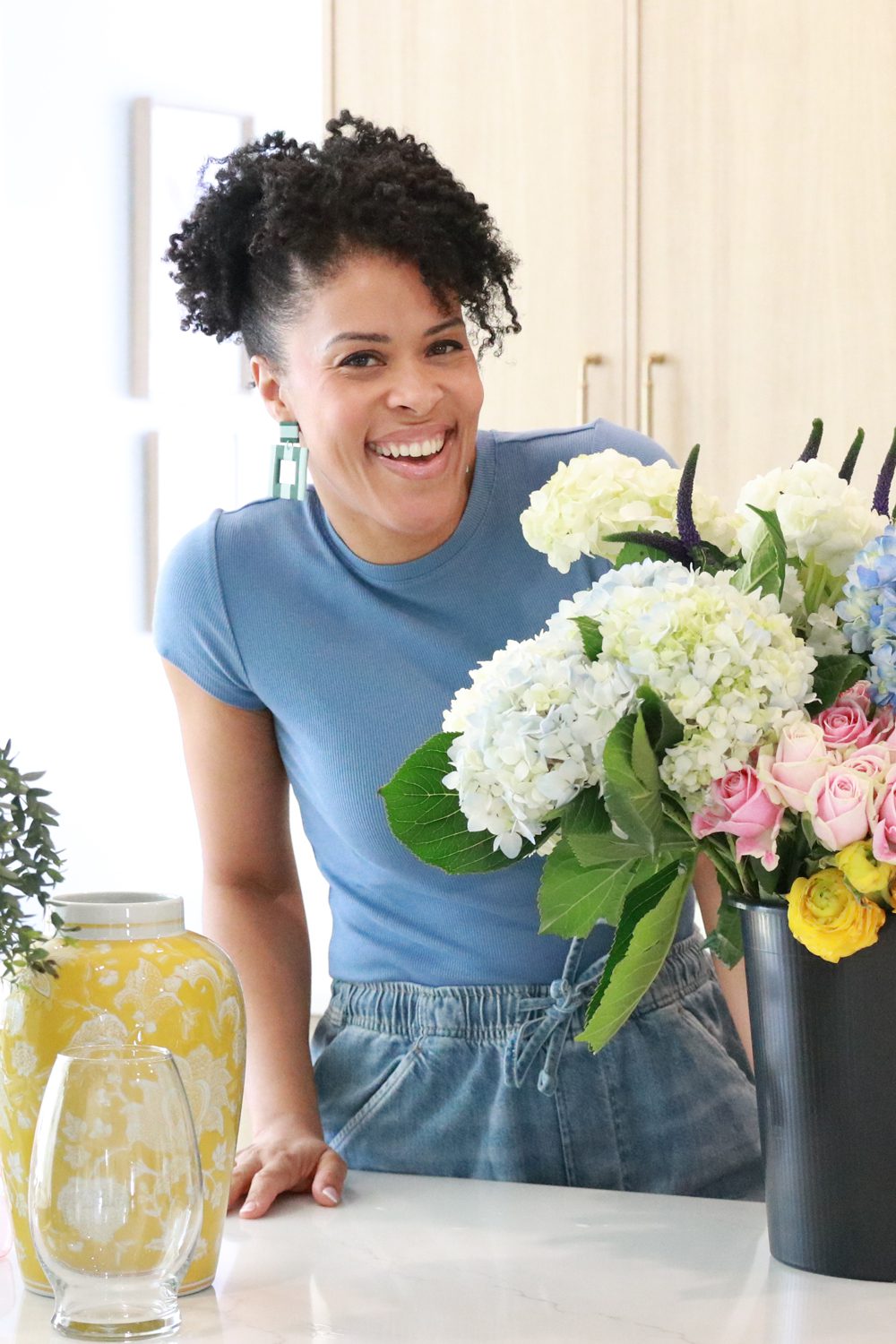
Hey, I’m Amber Kemp-Gerstel - the crafty brain behind Damask Love, where creativity, color, and a little chaos come together. I’m a suburban mom of two, known for turning up the volume on everyday DIYs and showing up like your colorful, crafty BFF. Over the years, I’ve gone from psychologist to full-time content creator, TV host, and brand partner, with appearances on Making It, Today, and HGTV. When I’m not making stuff or on set, I’m chasing around my two boys, Markus and Maxwell, and laughing my way through the mess.
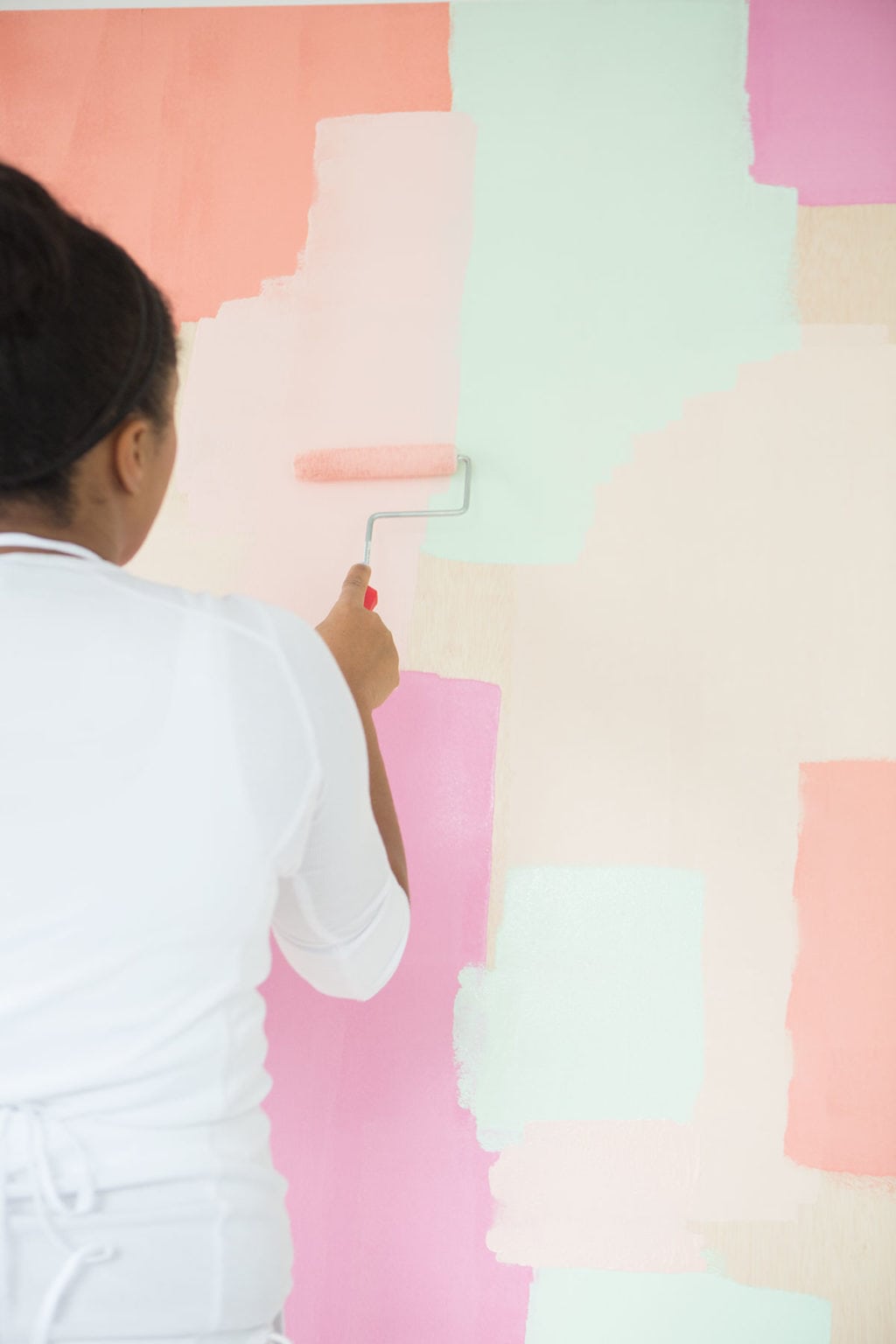
The wall of soft coral, pink and mint blocks with their torn edges reads like an oversized stack of paint chips; that beats my taped-together paper attempts by a mile. Our playroom wall gets a much messier version: the weekend tournament bracket grows there, six random creatures each on Random Pokemon Generator, and the results end up taped next to it. Do you repaint between projects, or does one mural serve for everything?
Such a clever casual browser game — Size It Up!
No downloads, no account required, just open the website and play. You compare real‑world object silhouettes and guess their true physical size only with your eyes.
There are hundreds of objects: dinosaurs, animals, wind turbines, landmarks and everyday items. Daily challenge gives 5 rounds for up to 1000 points.
It’s surprisingly educational. Many real‑world things are way bigger or smaller than I imagined. Perfect quick game for killing spare time.
Minor downside: no multiplayer mode. Still highly recommended for puzzle / trivia fans. https://sizeituponline.com/
What I keep staring at is that fresh pink patch going straight over the older blocks: nothing gets erased here, it just becomes part of the next layer. Same logic as a growing tattoo — my cousin adds to her sleeve piece by piece, previewing each design on Tinta Piel first so it sits right with everything already there. Do you map the whole wall out before you start, or let each layer decide the next?
The note about priming the poster paint first is such a good call, I made the mistake of skipping it on my first project and the coverage never looked right. Your before and after photos make the difference obvious. Adding this to my craft bookmark folder next to the Free Laya Model Online page I keep for weekend projects.
It’s interesting that the post focuses on paint tips for bloggers, yet the comment section has drifted into game and tool recommendations. I wonder if the original paint advice got buried or if the article was updated. For craft bloggers, surface prep and choosing the right finish for photo-friendly results seem like details worth expanding on. Do you find certain paints photograph better for tutorials?
Vocalove is an all-in-one AI creative toolkit packed with powerful image and video features.
It comes with AI Image Editor, AI Character Generator, AI Hairstyle Changer and the brand-new AI Hair Color Changer.
You can pick from multiple image models including Nano Banana, Nano Banana Pro, GPT Image 2.0, Flux Kontext Pro and Seedream 4.0 for image generation.
Beyond images, it also supports AI voice, speech cloning, image-to-video and trending AI video creation like Hotel Lobby style rap clips.
New users get free credits to test all functions without upfront payment.
Great for TikTok & Reels creators to make viral AI meme videos and character visuals quickly https://vocalove.io/ai-image
The idea of turning simple paint chips into a bold, layered wall is a great visual lesson for bloggers. The same kind of structured thinking helps when organizing creative projects, and Decisions Api is an interesting way to turn complex inputs into clear outcomes.
O código Morse pode ser usado para criar mensagens, entender sequências de pontos e traços ou ouvir como uma frase seria transmitida. Nesta ferramenta de código Morse, você pode converter nos dois sentidos, reproduzir o resultado em áudio e copiar a sequência pronta.
These tips are gold — lighting really does make or break paint colors on camera. The white balance trick is one I wish I’d learned before shooting a full gallery wall makeover. Thanks for sharing what works for you! Read more
Those torn-edge coral, pink and mint blocks really do read like an oversized stack of paint chips — a lovely way to bring colour to a plain wall without a full repaint. If you ever want to share a room makeover as a moving teaser instead of a gallery of stills, I came across aihotellobby.online: it turns two photos into a short hotel-lobby style duet video (orange room, MP4, 4, 10 or 15 seconds). It needs sign-in and runs on paid credits — no free tier — so it is not a craft tool, just a handy clip maker when you would rather not open an editing suite.
Useful paint tips for blogger photos — the point about shooting near a window for consistent light makes a real difference in craft photos. Small aside: for the printable gift tags and recipe cards a lot of us make, AI Signature Generator (ai-signature-generator.com) turns a typed name into a handwritten-style signature image (transparent PNG or SVG) that you can drop onto a printable, so a hand-signed look does not need a scanner.
It’s smart to frame paint tips specifically for bloggers — making a project and making it read well on camera are two different skills, and most craft posts gloss over that gap. I also liked the background: a psychologist who became a full-time maker, TV host and brand partner is a great arc. One small practical note: when a tutorial runs long with a lot of step-by-step detail, I use a free Chrome extension called ADHD Reading (adhd-reading.com) that shows the text one paragraph at a time and highlights word beginnings, which keeps me from skipping steps. Thanks for sharing the setup.
The pastel colour-block wall here is a good example of a project where the photo has to do nearly all of the explaining – soft tones like those are the fiddliest part of shooting any paint job. Nothing to do with paint, but if anyone reading is job hunting: mockinterview.tools is a free browser-based practice interview that runs from your own resume, no install needed.
Lovely frame to open the paint-tips post with: the roller caught mid-swipe against that pastel patchwork of pink, mint and cream says more than a tidy after shot would. Off-topic for paint, honestly, but a colour-block wall like that is the kind of palette Bead Pattern (beadpattern.app) works from – it turns one photo into a Perler or Hama grid with colour codes and bead counts, free in the browser.
It’s interesting that the article mentions turning up the volume on everyday DIYs, yet the actual paint tips seem sparse. I wonder if the focus is more on the creative mindset than specific techniques. For bloggers, balancing personality with practical advice can be tricky. How do you decide when to share detailed tutorials versus broader inspiration? I’d love to hear more about that balance.
No painter’s tape anywhere: the color blocks go up freehand, roller loaded with the loudest pink on the wall. Our AI bill gets handled the same way — one line at a time off LLMomics, each rate with its source shown. Brave choice, painting in white.
The point about prepping your surface before you commit to a color really resonates, especially for anyone shooting tutorials where the camera picks up every roller mark. One thing I’d add from my own experience is that project planning matters as much as paint choice: I keep a running log of costs and payback times while I build out my little house, which is actually how I ended up on the Nepo Baby vs LAPO Baby guide over at Lagos Life Wiki the other day. It’s a fan guide for the Lagos Life browser game, but honestly the habit of tracking every rent, fuel cost, and weekly tax number from the source rather than guessing has completely changed how I budget real craft supplies too. Your before and after shots make the priming step look so obvious in hindsight.
The priming note is the part most of us learn the hard way, and your before-and-after shots really sell it. One thing I’d add for anyone documenting a project over several weekends: keep a small swatch card of each color and finish, because phone cameras and editing apps shift warm pinks and mints in ways that make a later update look inconsistent. It also helps to note the batch or sheen on the card, since matte and satin read so differently on camera. When I’m not painting I spend my time writing patch breakdowns and update guides, so I keep a changelog for every project the same way I track the Witcher 3 remastered guide notes, so returning readers always see what actually changed. Your photo-friendly finish tips would make a great follow-up post.
The bit about priming before poster paint really resonated — I made that mistake on a set backdrop once and the coverage stayed blotchy no matter how many coats I added. One thing I’d add for craft bloggers: photographing wet paint is a nightmare because the sheen shifts under different light, so I shoot swatches after they’ve fully cured and note the finish type in the caption. That habit carried over from documenting a very different kind of progression — tracking each layer and stat down to the bottom of the map in this beginner drilling guide, where the whole point is recording what changed after every update. Same discipline applies to paint: log the prep, the finish, the lighting, and your tutorial photos stay consistent instead of surprising you later.
The point about priming before poster paint really resonated with me, because I learned the same lesson the hard way on a set of prop boxes that ended up blotchy and dull on camera. One thing I would add for bloggers: treat the finish as a documentation problem, not just a painting problem. Write down the exact brand, sheen and number of coats you used, plus the date you applied it, so when you revisit the surface months later you are not guessing. That habit of naming the source and the check date is something I picked up while building out rig and amp guides for The Outlast Trials rigs and upgrades, where every value has to be traceable. Craft tutorials benefit from the same discipline, and readers notice when your colour recipes are actually reproducible.
The idea of painting a mural or creating custom photo backdrops is a smart way to make a blogger’s visual identity more consistent. The image reference makes the connection between hands-on color work and stronger photography easy to understand, especially for creators who want their backgrounds to feel intentional. For anyone organizing visual concepts alongside written notes, Mistral Large 4 can help compare ideas and keep the creative brief structured. This is a concise reminder that a simple painted surface can become part of the storytelling around a project, not just a background.
Thank you for sharing these amazing paint tips! I’ve recently started revamping my home office, and your advice on prep work really resonated with me. I underestimated how crucial that step was—now the finished look is so much smoother! I’ll definitely be using the ‘curve rush’ technique next time.
These paint tips are especially helpful for bloggers who need their project photos to look consistent across tutorials, social posts, and seasonal updates. The advice about color, coverage, and creating a clean backdrop can make a real difference on camera. I’ve also found that Krea 2 is useful when editing craft photos or generating supporting visuals while preserving the original image’s style. It’s a practical way to refine a composition without losing the colors and personality that make handmade content feel authentic.
These paint tips are especially helpful for bloggers creating colorful DIY tutorials. Good visuals matter, but clean audio can make process videos much easier to follow too. When background music competes with a voiceover, I use this browser-based tool to remove vocals from a song online or extract an instrumental track without installing extra software. It’s a practical option for polishing craft reels, step-by-step videos, and project recaps while keeping the focus on the instructions and finished design.
The color blocks are a clear way to test a palette before painting. For a short clip of a wall project I use an AI video generator, Kling AI, at https://kling4.org/.
The reminder to prepare the surface before painting is especially useful for bloggers who need clean, consistent photos. I also like the idea of treating the backdrop as part of the story; Instinct AI brings video, image, voice, and music tools together for developing visual concepts around a project. Thanks for the practical tips!
The image description connects painted murals with photo backdrops, which is a helpful way to think about the same surface serving different creative purposes. A caption about the finish and lighting setup would make the image reference even more useful. Palette and backdrop concepts are also relevant to our visual-prompt preview, BananaNano Art, while real paint samples and photographs remain the reference for how a finished surface actually looks.
The image description makes a useful connection between painting a mural and creating a photo backdrop. Thinking about the background as part of a project’s photography is a practical prompt for bloggers planning their visual style. pips2
Love the colorful energy here! If you ever need a fun creative break, check out Page Rage—a free jetpack shooting game where you can destructively smash websites. It’s chaotic, hilarious, and requires no install. Perfect for when you want to let out some stress after DIYing! jetpack shooting game
The coral, mint and pink blocks in the photo have uneven edges, which makes the backdrop feel painted rather than printed. Leaving pale spaces between some of the colours also gives small objects room to stand out in a photograph. Was the narrow roller used to build the shapes freehand, or were their outlines planned first?
The primer point is the one I keep coming back to. I skipped it on my first mural and the coverage never looked even, exactly like your before-and-after shows. One thing I’d add for bloggers: treat your paint layers like a documented system, the way game guide writers do. I keep a small notebook of which base coat, finish and drying time each project used, because readers always ask why two tutorials with the same colour look different in photos. A good example of that sourcing habit is the Anime Zero Wiki weapons guide, where each entry lists rarity, source and the date it was last checked. Do you log your own paint combos, or just eyeball the next layer?
A wall of color blocks painted to serve as a backdrop — a lot of work to look so casual. My craft videos share one hidden tax: a fridge hum under every narration line, gone after one pass through NoiseClear. My studio corner is jealous.
The coral, mint and pink blocks keep this backdrop lively without needing crisp taped edges. Leaving some pale space between the stronger colors seems especially helpful for keeping a photographed subject distinct from the wall. It would be useful to compare a close crop with a wider shot to see how the scale of the painted patches changes the effect.
The reminder to prep the surface before painting is so useful, especially when a wall is going to double as a photo backdrop for tutorials. The layered coral, mint, and pink colors make the project feel playful while still giving the photos a consistent setting.
For creators who want to animate still characters, Motion Control AI can transfer movement from a reference video to a character image.
For craft bloggers planning visuals before a shoot, APIXO offers multiple AI image and video models for exploring creative concepts. Photos of the finished project remain useful for showing the actual result.
Great tips, Amber! The idea of using native audio in video generation is a game-changer for bloggers. Would love to see how Muse Video can bring these ideas to life with that extra touch of realism. muse native audio to video
The advice about preparing the surface before painting is especially useful for bloggers who need consistent photos across tutorials. For planning the visual, motion, and audio around a project, Kenerate AI brings image, video, voiceover, and music workflows together in one creative studio.
AnyPS5 is not an emulator. AnyPS5 is a relinker. An emulator simulates the PlayStation 5 around the original game; AnyPS5 rewrites the PS5 game into a native host binary once, ahead of time, and the resulting the relinker binary runs directly on the host operating system with no virtual console in between.
The reminder to prepare the surface before painting is especially useful for bloggers who need consistent photos across tutorials. I also like the idea of treating the backdrop as part of the story: the color blocks create a repeatable visual identity without making the project feel too polished. When planning a series of creative posts, I use Trends Monitor to watch rising search queries and decide which topics are worth developing into evergreen tutorials.
I love that you went with flat paint—nothing worse than glare in a photo. My own taste runs toward food-named colors too, so Guava Jelly and Pumpkin Essence would be hard to resist. If those backdrops ever end up in short Instagram clips, Seedance 2.5 can edit clips up to 30 seconds.
I’ve tested dozens of online video tools, and vid2mp4.co is easily one of my go-to picks. It supports YouTube to MP4 along with TikTok, Instagram, X, Reddit and many other platforms.
What makes it different from most simple link downloaders: it’s not only for grabbing videos from URLs. You can also upload your local files to convert video formats and compress videos right in the browser. I often shrink large MOV or MKV files here to MP4 for sharing, it helps cut file size while keeping decent visual quality. Give it a try: [http://vid2mp4.co](http://vid2mp4.co)
A personalized rap prompt works best with a name, an occasion and one specific memory or inside joke. Keep the message focused so the performance has a clear theme.
This image attachment would be easier to follow with a short caption linking it to the relevant paint tip. Is there a particular preparation or finish detail readers should notice? I work on creative video content at https://burningbridgesaivideo.pro/ and am interested in how a clear caption helps explain a visual.
The wall of soft coral, pink and mint blocks with their torn edges reads like an oversized stack of paint chips; that beats my taped-together paper attempts by a mile. Our playroom wall gets a much messier version: the weekend tournament bracket grows there, six random creatures each on Random Pokemon Generator, and the results end up taped next to it. Do you repaint between projects, or does one mural serve for everything?
As a suburban mom of two little boys who love messy craft projects, I’m curious if these paint tips will help keep the chaos under control.
Aijev API overview
I didn’t know you were a former psychologist turned craft blogger—can’t wait to read your paint tips for fellow creators!
view regional dates
As a fellow blogger and mom of two, I’d love to hear how your paint tips fit around balancing messy kid chaos and content deadlines.
Explore Meowdoku
Such a clever casual browser game — Size It Up!
No downloads, no account required, just open the website and play. You compare real‑world object silhouettes and guess their true physical size only with your eyes.
There are hundreds of objects: dinosaurs, animals, wind turbines, landmarks and everyday items. Daily challenge gives 5 rounds for up to 1000 points.
It’s surprisingly educational. Many real‑world things are way bigger or smaller than I imagined. Perfect quick game for killing spare time.
Minor downside: no multiplayer mode. Still highly recommended for puzzle / trivia fans.
https://sizeituponline.com/
What I keep staring at is that fresh pink patch going straight over the older blocks: nothing gets erased here, it just becomes part of the next layer. Same logic as a growing tattoo — my cousin adds to her sleeve piece by piece, previewing each design on Tinta Piel first so it sits right with everything already there. Do you map the whole wall out before you start, or let each layer decide the next?
The note about priming the poster paint first is such a good call, I made the mistake of skipping it on my first project and the coverage never looked right. Your before and after photos make the difference obvious. Adding this to my craft bookmark folder next to the Free Laya Model Online page I keep for weekend projects.
It’s interesting that the post focuses on paint tips for bloggers, yet the comment section has drifted into game and tool recommendations. I wonder if the original paint advice got buried or if the article was updated. For craft bloggers, surface prep and choosing the right finish for photo-friendly results seem like details worth expanding on. Do you find certain paints photograph better for tutorials?
Vocalove is an all-in-one AI creative toolkit packed with powerful image and video features.
It comes with AI Image Editor, AI Character Generator, AI Hairstyle Changer and the brand-new AI Hair Color Changer.
You can pick from multiple image models including Nano Banana, Nano Banana Pro, GPT Image 2.0, Flux Kontext Pro and Seedream 4.0 for image generation.
Beyond images, it also supports AI voice, speech cloning, image-to-video and trending AI video creation like Hotel Lobby style rap clips.
New users get free credits to test all functions without upfront payment.
Great for TikTok & Reels creators to make viral AI meme videos and character visuals quickly
https://vocalove.io/ai-image
The idea of turning simple paint chips into a bold, layered wall is a great visual lesson for bloggers. The same kind of structured thinking helps when organizing creative projects, and Decisions Api is an interesting way to turn complex inputs into clear outcomes.
Try this website to decode your destiny: Bazi calculator and analysis
O código Morse pode ser usado para criar mensagens, entender sequências de pontos e traços ou ouvir como uma frase seria transmitida. Nesta ferramenta de código Morse, você pode converter nos dois sentidos, reproduzir o resultado em áudio e copiar a sequência pronta.
These tips are gold — lighting really does make or break paint colors on camera. The white balance trick is one I wish I’d learned before shooting a full gallery wall makeover. Thanks for sharing what works for you! Read more
Those torn-edge coral, pink and mint blocks really do read like an oversized stack of paint chips — a lovely way to bring colour to a plain wall without a full repaint. If you ever want to share a room makeover as a moving teaser instead of a gallery of stills, I came across aihotellobby.online: it turns two photos into a short hotel-lobby style duet video (orange room, MP4, 4, 10 or 15 seconds). It needs sign-in and runs on paid credits — no free tier — so it is not a craft tool, just a handy clip maker when you would rather not open an editing suite.
Useful paint tips for blogger photos — the point about shooting near a window for consistent light makes a real difference in craft photos. Small aside: for the printable gift tags and recipe cards a lot of us make, AI Signature Generator (ai-signature-generator.com) turns a typed name into a handwritten-style signature image (transparent PNG or SVG) that you can drop onto a printable, so a hand-signed look does not need a scanner.
It’s smart to frame paint tips specifically for bloggers — making a project and making it read well on camera are two different skills, and most craft posts gloss over that gap. I also liked the background: a psychologist who became a full-time maker, TV host and brand partner is a great arc. One small practical note: when a tutorial runs long with a lot of step-by-step detail, I use a free Chrome extension called ADHD Reading (adhd-reading.com) that shows the text one paragraph at a time and highlights word beginnings, which keeps me from skipping steps. Thanks for sharing the setup.
The pastel colour-block wall here is a good example of a project where the photo has to do nearly all of the explaining – soft tones like those are the fiddliest part of shooting any paint job. Nothing to do with paint, but if anyone reading is job hunting: mockinterview.tools is a free browser-based practice interview that runs from your own resume, no install needed.
Lovely frame to open the paint-tips post with: the roller caught mid-swipe against that pastel patchwork of pink, mint and cream says more than a tidy after shot would. Off-topic for paint, honestly, but a colour-block wall like that is the kind of palette Bead Pattern (beadpattern.app) works from – it turns one photo into a Perler or Hama grid with colour codes and bead counts, free in the browser.
看到那个粉嫩的彩色拼接墙我就手痒了,昨天泡咖啡时顺手拿手机拍了张乱糟糟的手作桌想修图,结果直接用这个好用的 text remover 把杂乱背景去掉了,真是太省心啦。
It’s interesting that the article mentions turning up the volume on everyday DIYs, yet the actual paint tips seem sparse. I wonder if the focus is more on the creative mindset than specific techniques. For bloggers, balancing personality with practical advice can be tricky. How do you decide when to share detailed tutorials versus broader inspiration? I’d love to hear more about that balance.
No painter’s tape anywhere: the color blocks go up freehand, roller loaded with the loudest pink on the wall. Our AI bill gets handled the same way — one line at a time off LLMomics, each rate with its source shown. Brave choice, painting in white.
The point about prepping your surface before you commit to a color really resonates, especially for anyone shooting tutorials where the camera picks up every roller mark. One thing I’d add from my own experience is that project planning matters as much as paint choice: I keep a running log of costs and payback times while I build out my little house, which is actually how I ended up on the Nepo Baby vs LAPO Baby guide over at Lagos Life Wiki the other day. It’s a fan guide for the Lagos Life browser game, but honestly the habit of tracking every rent, fuel cost, and weekly tax number from the source rather than guessing has completely changed how I budget real craft supplies too. Your before and after shots make the priming step look so obvious in hindsight.
Great article! I really enjoyed reading this post. Thanks for sharing such valuable information. madhur bazar
The priming note is the part most of us learn the hard way, and your before-and-after shots really sell it. One thing I’d add for anyone documenting a project over several weekends: keep a small swatch card of each color and finish, because phone cameras and editing apps shift warm pinks and mints in ways that make a later update look inconsistent. It also helps to note the batch or sheen on the card, since matte and satin read so differently on camera. When I’m not painting I spend my time writing patch breakdowns and update guides, so I keep a changelog for every project the same way I track the Witcher 3 remastered guide notes, so returning readers always see what actually changed. Your photo-friendly finish tips would make a great follow-up post.
The bit about priming before poster paint really resonated — I made that mistake on a set backdrop once and the coverage stayed blotchy no matter how many coats I added. One thing I’d add for craft bloggers: photographing wet paint is a nightmare because the sheen shifts under different light, so I shoot swatches after they’ve fully cured and note the finish type in the caption. That habit carried over from documenting a very different kind of progression — tracking each layer and stat down to the bottom of the map in this beginner drilling guide, where the whole point is recording what changed after every update. Same discipline applies to paint: log the prep, the finish, the lighting, and your tutorial photos stay consistent instead of surprising you later.
The point about priming before poster paint really resonated with me, because I learned the same lesson the hard way on a set of prop boxes that ended up blotchy and dull on camera. One thing I would add for bloggers: treat the finish as a documentation problem, not just a painting problem. Write down the exact brand, sheen and number of coats you used, plus the date you applied it, so when you revisit the surface months later you are not guessing. That habit of naming the source and the check date is something I picked up while building out rig and amp guides for The Outlast Trials rigs and upgrades, where every value has to be traceable. Craft tutorials benefit from the same discipline, and readers notice when your colour recipes are actually reproducible.
The idea of painting a mural or creating custom photo backdrops is a smart way to make a blogger’s visual identity more consistent. The image reference makes the connection between hands-on color work and stronger photography easy to understand, especially for creators who want their backgrounds to feel intentional. For anyone organizing visual concepts alongside written notes, Mistral Large 4 can help compare ideas and keep the creative brief structured. This is a concise reminder that a simple painted surface can become part of the storytelling around a project, not just a background.
Thank you for sharing these amazing paint tips! I’ve recently started revamping my home office, and your advice on prep work really resonated with me. I underestimated how crucial that step was—now the finished look is so much smoother! I’ll definitely be using the ‘curve rush’ technique next time.
These paint tips are especially helpful for bloggers who need their project photos to look consistent across tutorials, social posts, and seasonal updates. The advice about color, coverage, and creating a clean backdrop can make a real difference on camera. I’ve also found that Krea 2 is useful when editing craft photos or generating supporting visuals while preserving the original image’s style. It’s a practical way to refine a composition without losing the colors and personality that make handmade content feel authentic.
These paint tips are especially helpful for bloggers creating colorful DIY tutorials. Good visuals matter, but clean audio can make process videos much easier to follow too. When background music competes with a voiceover, I use this browser-based tool to remove vocals from a song online or extract an instrumental track without installing extra software. It’s a practical option for polishing craft reels, step-by-step videos, and project recaps while keeping the focus on the instructions and finished design.
The color blocks are a clear way to test a palette before painting. For a short clip of a wall project I use an AI video generator, Kling AI, at https://kling4.org/.
The reminder to prepare the surface before painting is especially useful for bloggers who need clean, consistent photos. I also like the idea of treating the backdrop as part of the story; Instinct AI brings video, image, voice, and music tools together for developing visual concepts around a project. Thanks for the practical tips!
The image description connects painted murals with photo backdrops, which is a helpful way to think about the same surface serving different creative purposes. A caption about the finish and lighting setup would make the image reference even more useful. Palette and backdrop concepts are also relevant to our visual-prompt preview, BananaNano Art, while real paint samples and photographs remain the reference for how a finished surface actually looks.
The image description makes a useful connection between painting a mural and creating a photo backdrop. Thinking about the background as part of a project’s photography is a practical prompt for bloggers planning their visual style. pips2
Love the colorful energy here! If you ever need a fun creative break, check out Page Rage—a free jetpack shooting game where you can destructively smash websites. It’s chaotic, hilarious, and requires no install. Perfect for when you want to let out some stress after DIYing! jetpack shooting game
The coral, mint and pink blocks in the photo have uneven edges, which makes the backdrop feel painted rather than printed. Leaving pale spaces between some of the colours also gives small objects room to stand out in a photograph. Was the narrow roller used to build the shapes freehand, or were their outlines planned first?
The primer point is the one I keep coming back to. I skipped it on my first mural and the coverage never looked even, exactly like your before-and-after shows. One thing I’d add for bloggers: treat your paint layers like a documented system, the way game guide writers do. I keep a small notebook of which base coat, finish and drying time each project used, because readers always ask why two tutorials with the same colour look different in photos. A good example of that sourcing habit is the Anime Zero Wiki weapons guide, where each entry lists rarity, source and the date it was last checked. Do you log your own paint combos, or just eyeball the next layer?
A wall of color blocks painted to serve as a backdrop — a lot of work to look so casual. My craft videos share one hidden tax: a fridge hum under every narration line, gone after one pass through NoiseClear. My studio corner is jealous.
The coral, mint and pink blocks keep this backdrop lively without needing crisp taped edges. Leaving some pale space between the stronger colors seems especially helpful for keeping a photographed subject distinct from the wall. It would be useful to compare a close crop with a wider shot to see how the scale of the painted patches changes the effect.
The reminder to prep the surface before painting is so useful, especially when a wall is going to double as a photo backdrop for tutorials. The layered coral, mint, and pink colors make the project feel playful while still giving the photos a consistent setting.
For creators who want to animate still characters, Motion Control AI can transfer movement from a reference video to a character image.
For craft bloggers planning visuals before a shoot, APIXO offers multiple AI image and video models for exploring creative concepts. Photos of the finished project remain useful for showing the actual result.
Great tips, Amber! The idea of using native audio in video generation is a game-changer for bloggers. Would love to see how Muse Video can bring these ideas to life with that extra touch of realism. muse native audio to video
The advice about preparing the surface before painting is especially useful for bloggers who need consistent photos across tutorials. For planning the visual, motion, and audio around a project, Kenerate AI brings image, video, voiceover, and music workflows together in one creative studio.
AnyPS5 is not an emulator. AnyPS5 is a relinker. An emulator simulates the PlayStation 5 around the original game; AnyPS5 rewrites the PS5 game into a native host binary once, ahead of time, and the resulting the relinker binary runs directly on the host operating system with no virtual console in between.
Good article! Anyone looking for Search For The Needle tips should visit https://needle.wiki/
The reminder to prepare the surface before painting is especially useful for bloggers who need consistent photos across tutorials. I also like the idea of treating the backdrop as part of the story: the color blocks create a repeatable visual identity without making the project feel too polished. When planning a series of creative posts, I use Trends Monitor to watch rising search queries and decide which topics are worth developing into evergreen tutorials.
I love that you went with flat paint—nothing worse than glare in a photo. My own taste runs toward food-named colors too, so Guava Jelly and Pumpkin Essence would be hard to resist. If those backdrops ever end up in short Instagram clips, Seedance 2.5 can edit clips up to 30 seconds.
I’ve tested dozens of online video tools, and vid2mp4.co is easily one of my go-to picks. It supports YouTube to MP4 along with TikTok, Instagram, X, Reddit and many other platforms.
What makes it different from most simple link downloaders: it’s not only for grabbing videos from URLs. You can also upload your local files to convert video formats and compress videos right in the browser. I often shrink large MOV or MKV files here to MP4 for sharing, it helps cut file size while keeping decent visual quality. Give it a try: [http://vid2mp4.co](http://vid2mp4.co)
A personalized rap prompt works best with a name, an occasion and one specific memory or inside joke. Keep the message focused so the performance has a clear theme.
rapduos.com
This image attachment would be easier to follow with a short caption linking it to the relevant paint tip. Is there a particular preparation or finish detail readers should notice? I work on creative video content at https://burningbridgesaivideo.pro/ and am interested in how a clear caption helps explain a visual.